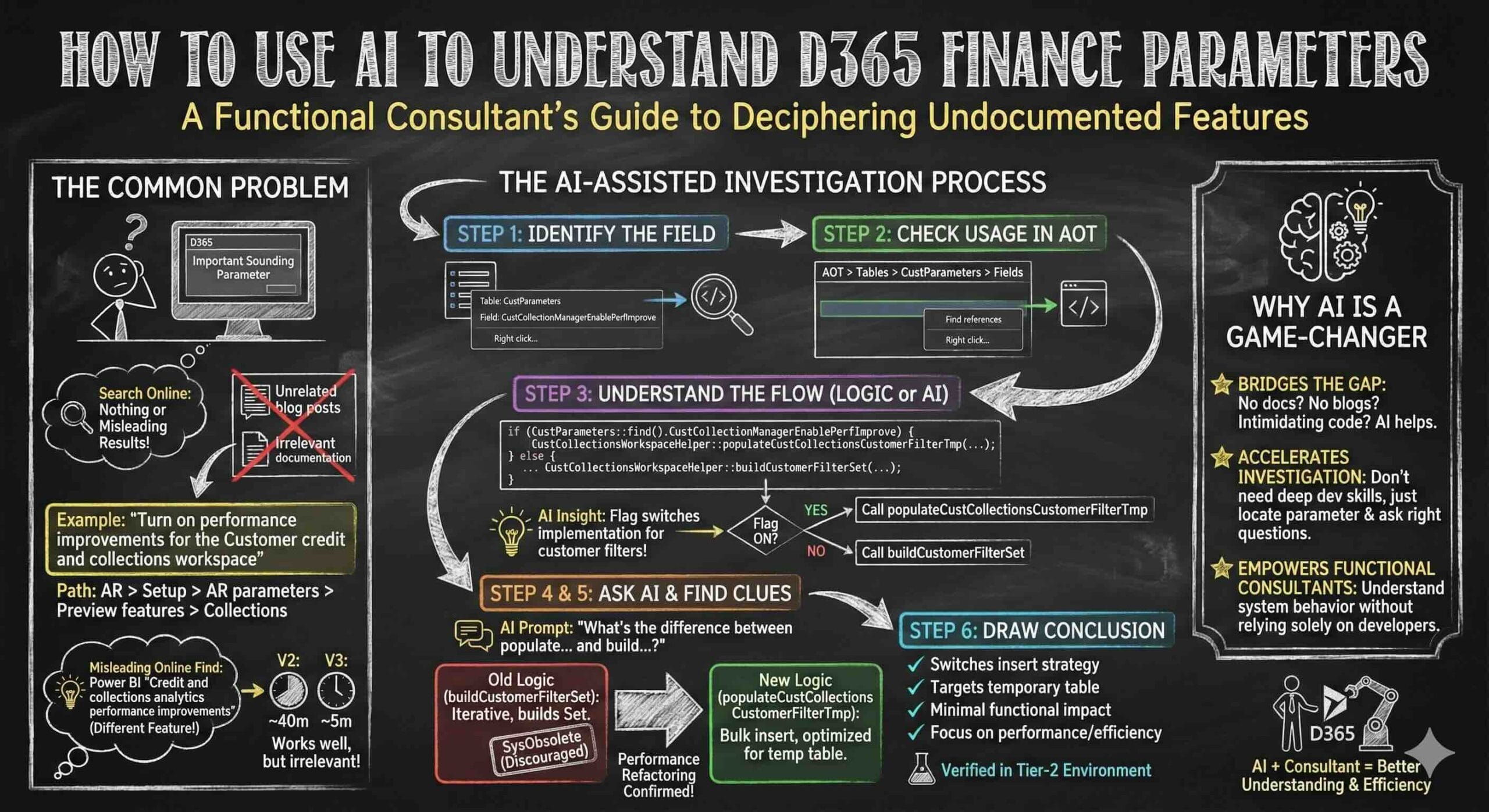
A couple of weeks ago, I wrote a blog called “How GitHub Copilot Can Help a Functional Consultant in D365”, where I shared how AI can assist functional consultants in daily work, even without deep development experience.
Today, I want to share another real example – how AI helped me understand a Accounts Receivable parameter does.
This is a common situation for functional consultants:
a parameter exists, the name sounds important, but there is little or no official documentation we can utilize to determine if it fits or not.
Recently, I was asked about the following parameter:
“Turn on performance improvements for the Customer credit and collections workspace”
You can find it under: Accounts Receivable > Set up > Accounts Receivable parameters > Preview features > Collections
When researching this flag, there were no articles directly explaining it. The most “relevant” article I found talked about Credit and collections management Power BI content, and mentioned a feature called: “Credit and collections analytics performance improvements”. However, I happend to know that this is NOT the same thing.
This is a Power BI feature that enabled via Feature management, and it switches the data source from CustCollectionsBIMeasurementsV2 → CustCollectionsBIMeasurementsV3
Back to our parameter.
By right-clicking the field and checking details, we can see:
- Table: CustParameters
- Field name: CustCollectionManagerEnablePerfImprove
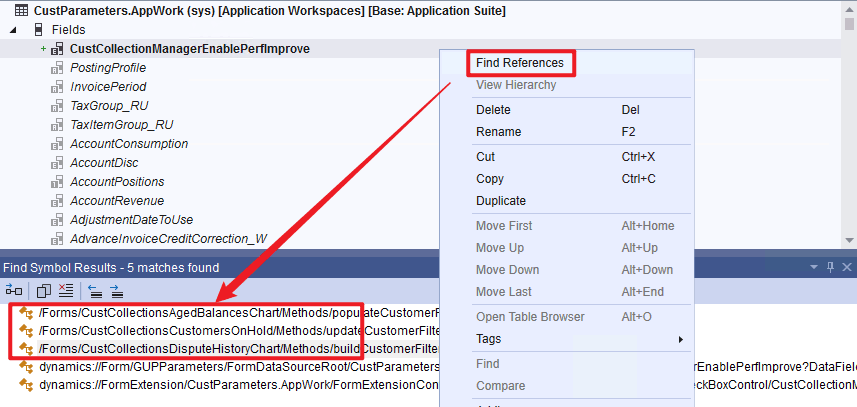
Using a development VM , I went to:
AOT > Tables > CustParameters (AppWork) > Fields
From there:
- Right-click the field
- Select Find references
The result shows 3 forms using this field.
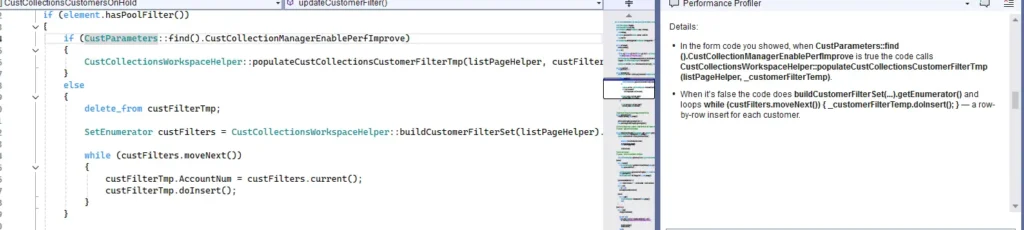
When opening each reference, I noticed a very similar code pattern like this:
if (CustParameters::find().CustCollectionManagerEnablePerfImprove)
{
    CustCollectionsWorkspaceHelper::populateCustCollectionsCustomerFilterTmp(
        listPageHelper, _customerFilterTemp);
}
else
{
    SetEnumerator custFilters =
        CustCollectionsWorkspaceHelper::buildCustomerFilterSet(listPageHelper).getEnumerator();
    ...
}
if you know if else logic, you know If the flag is ON → system calls populateCustCollectionsCustomerFilterTmp, otherwise, system calls buildCustomerFilterSet, or if you don’t know the logic, you can ask AI for help, I asked Copilot something like:
“How does CustCollectionManagerEnablePerfImprove work?”
AI explained as shown below:
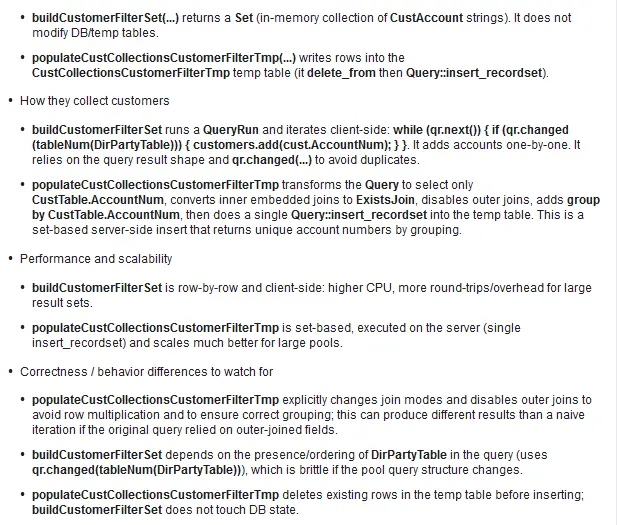
The next question to AI is:
What is the difference between
populateCustCollectionsCustomerFilterTmpandbuildCustomerFilterSet?
Copilot explained as shown below:
When I inspected buildCustomerFilterSet, I noticed something important: There is a SysObsolete attribute above the method. I just read a blog by Kurt Hatlevik explaining SysObsolete this morning, and based on that knowledge: SysObsolete means Microsoft discourages further usage of this method and plans to replace it with a newer implementation.
This perfectly aligns with our findings:
- Old logic →
buildCustomerFilterSet - New logic →
populateCustCollectionsCustomerFilterTmp - Parameter controls which one is used
At this point, you could go deeper and ask AI: “What does insert_recordset do?”
But for me, this was enough. I now understand that:
- The flag switches the insert strategy
- The insert is targeting a temporary table
- Therefore, I do not expect significant functional impact
- The change is mainly about performance and efficiency
To be safe, I still tested this in a Tier-2 environment, and the result matched what I learned from AI.
This example shows how AI helps functional consultants who do not have development experience.
You just need to:
- Locate the parameter
- Find where it’s used
- Ask the right questions to AI
AI doesn’t replace understanding — it accelerates investigation.