The previous post I discussed is how to set up Collection Automation process. After spending some time testing the collections process automation setup, I ran into a few behaviors that weren’t obvious from the documentation. These notes are specific to when collection letters are configured at the customer level.
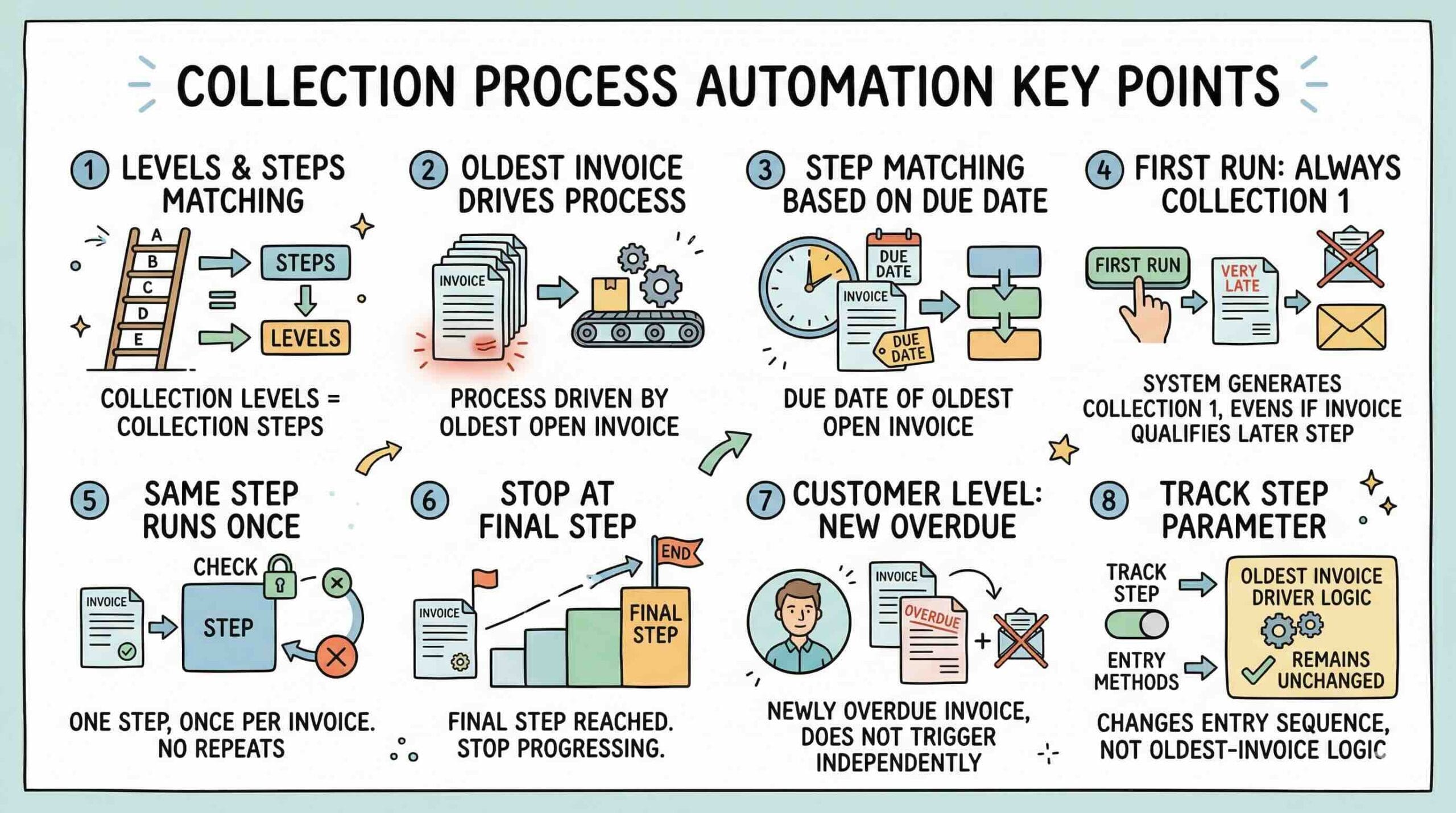
1. The number of collection letter levels should match the number of collection-letter steps in the process hierarchy
Each collection-letter step in the automation process acts as a trigger point that allows the system to move the customer forward in the collection letter sequence. Because of that, if you want the system to automatically issue three collection letters, you should generally have three corresponding collection-letter steps in the process hierarchy.
Example:
If your collection letter sequence includes:
- Collection 1
- Collection 2
- Collection 3
then your process hierarchy should also include three collection-letter steps, such as:
- 5 days after due date → Collection 1
- 10 days after due date → Collection 2
- 15 days after due date → Collection 3
Otherwise, the system may not have enough automation steps to support the full collection letter sequence.
2. The process is always driven by the oldest open invoice for the customer
Collections process automation does not evaluate each invoice independently and does not prioritize the most recently overdue invoice. Instead, it looks at the leading, or oldest open, invoice for the customer and uses that invoice to drive the automation logic.
Example:
Assume a customer has the following open invoices:
- Invoice A: due on June 1, 2024, still unpaid
- Invoice B: due on March 10, 2026, recently overdue
Even though Invoice B is newer and has just become overdue, the system will still use Invoice A to determine the customer’s collections activity because it is the oldest open invoice.
3. Step matching is based on the due date of the oldest open invoice
Once the system identifies the oldest open invoice, it compares that invoice’s due date to the current date and determines which configured step most closely applies.
Example:
Using this process hierarchy:
- 5 days after due date → Collection 1
- 10 days after due date → Collection 2
- 15 days after due date → Collection 3
if the oldest open invoice is more than a year overdue, then that invoice already qualifies for the last configured step, which is the 15-days-past-due step.
4. The same step will not run more than once for the same invoice
A step is not repeatedly reused for the same invoice. Once a specific invoice has already gone through a specific step, that same step will not run again for that invoice.
Example:
If the oldest invoice matched the 15-days-past-due step and the system used that step when automation first ran, that same 15-day step will not be triggered again later for that same invoice.
This is important because it means the system does not “replay” the same step to generate the next collection letter.
5. If an old invoice already falls into the final configured step, the automation can stop progressing
This is the main practical issue. When an old invoice is already overdue enough to match the final step in the process, and there are no later steps configured, the automation may have no new step left to advance to after the first letter is created.
Example:
Assume the process hierarchy only includes these three steps:
- 5 days after due date → Collection 1
- 10 days after due date → Collection 2
- 15 days after due date → Collection 3
Now assume the customer has an old invoice from 2024 that is still unpaid. On the first automation run:
- the system uses that invoice because it is the oldest open invoice
- the invoice already qualifies for the final step
- but the system may still generate only Collection 1
After that, the process can become stuck because:
- the same step will not run again for the same invoice
- there are no later steps beyond 15 days
- the old invoice remains the oldest open invoice
As a result, the customer may not continue progressing automatically to Collection 2 and Collection 3.
6. In customer-level processing, a newly overdue invoice does not independently trigger a new collection letter
When collection letters are processed at the customer level, the system tracks one collection letter level for the customer as a whole. New overdue invoices are added to the customer’s outstanding balance, but they do not independently restart or advance the collection process.
Example:
Continuing the prior scenario, assume the same customer later receives a new invoice that also becomes overdue.
Even then, the system may still not create a new collection letter, because:
- the customer-level process is still being driven by the old 2024 invoice
- the automation has no new step available to advance
- the new invoice does not take over as the new driver of the collection process
In other words, the presence of a newer overdue invoice does not necessarily cause the customer to receive another collection letter.
7. The “Track step in collections process automation” parameter changes how the invoice enters the sequence, but it does not change the oldest-invoice driver logic
Starting in version 10.0.39, Microsoft introduced the Track step in collections process automation parameter. This setting helps control whether invoices start at the first step in the process or at the step that most closely matches the current overdue age.
However, this parameter does not change the fact that the automation is still driven by the oldest open invoice for the customer.
Example:
Using the same old invoice scenario:
- If Track step = No, the invoice may begin with the activity that most closely matches its overdue age.
- If Track step = Yes, the invoice is intended to begin at the first step in the process and move through the sequence.
But in both cases, the system is still using the oldest open invoice to determine which invoice drives the customer’s collections process. The setting affects step progression, not the fundamental driver of the process.
Final Observation
The biggest takeaway is that collections process automation, when used at the customer level, is not simply a matter of “if an invoice is overdue, send the next letter.” The actual behavior is driven by a combination of factors:
- the oldest open invoice
- the configured automation steps
- whether the first run starts at Collection 1
- the rule that the same step does not run twice for the same invoice
- and whether there are additional later steps available
A very old unpaid invoice can essentially lock the customer at the last configured automation step, preventing the system from reacting to any newer overdue activity.